
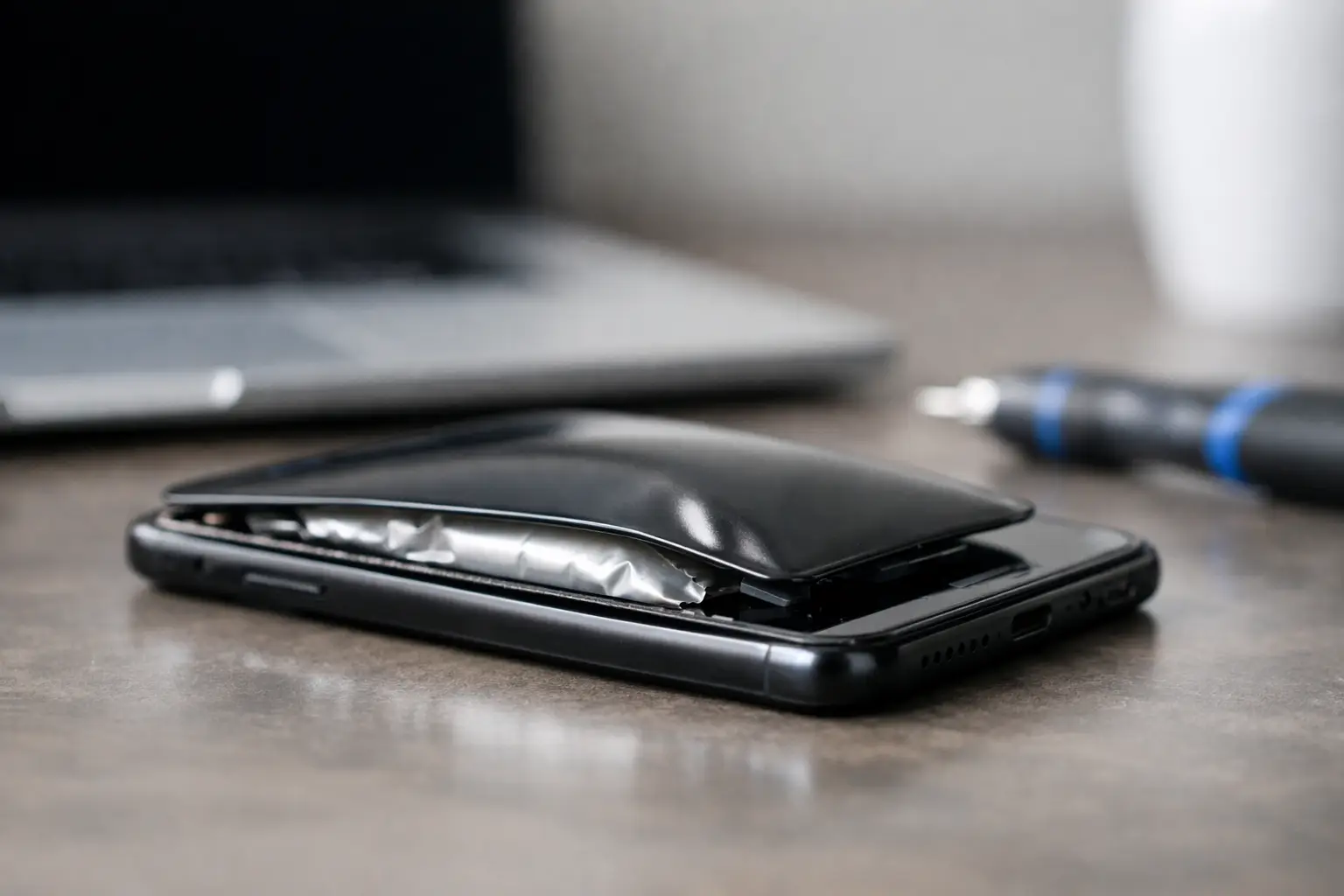
A phone that suddenly will not sit flat on a table is not having a minor cosmetic issue. If the screen is lifting, the back cover is separating, or the device feels unusually tight around its edges, stop using it. People sometimes ask, “when should phone batteries swell?” The straightforward answer is never. A swollen battery is a fault that needs prompt, careful action.
Modern phone batteries are compact, powerful lithium-ion cells. They make fast charging, slim designs and all-day use possible, but they also need to remain sealed and stable. When the chemistry inside a battery begins to break down, gas can build up inside the cell. That pressure makes the battery expand and can push against the screen, back cover and internal components.
When should phone batteries swell?
They should not. A healthy battery may lose capacity over time, meaning it runs down sooner than it once did, but it should not physically expand. Swelling is a sign that the battery has deteriorated, suffered damage or been exposed to conditions it cannot safely handle.
This does not automatically mean a phone will catch fire, and there is no need to panic. However, it does mean the device should be treated as a safety issue rather than charged overnight in the hope that it improves. Continuing to use or charge a swollen battery increases the risk of leaking, overheating, screen damage and, in rare cases, fire.
The safest decision is to switch the phone off if you can do so without pressing hard on a lifted screen or cover. Do not put it back on charge, do not try to flatten it, and arrange a professional assessment as soon as possible.
The signs are not always obvious
A badly swollen battery is often easy to spot. The screen may lift away from the frame, especially along one side, or the rear panel may begin to separate. On some models, the phone rocks on a flat surface because the centre of the back cover is bulging.
Early swelling can be less visible. You might notice that a case no longer fits correctly, the display is developing pressure marks, or a previously flush back cover has a small gap. Buttons can feel stiff because the expanding battery is pressing against the frame. If your phone has started to feel thicker without a clear reason, it is worth having it checked.
Heat and poor battery life often appear alongside these physical changes. A warm phone after heavy use is not unusual, particularly while gaming, navigating or charging. A phone that becomes hot while idle, loses charge very quickly, restarts unexpectedly or has a visibly lifting screen needs more attention.
A cracked screen may hide the real problem
It is easy to assume a lifting display is simply the result of a drop or failed screen adhesive. Sometimes it is. But if the screen is being pushed upwards from beneath, the battery may be the cause. Reattaching the screen without checking the battery can trap a serious problem inside the phone and may crack the display further.
A repair technician can inspect the device and distinguish between a loose screen, frame damage and battery expansion. That diagnosis matters because the correct repair is not always the one that first appears obvious.
Why do phone batteries swell?
Battery ageing is one of the most common causes. Lithium-ion batteries are consumable components. Every charge cycle causes a small amount of wear, and after years of daily charging the internal materials become less stable. Swelling is not a normal stage of ageing, but the likelihood rises as a battery becomes worn.
Heat is another major factor. Leaving a phone in direct sun, in a hot car, under bedding while charging or beside a heat source can stress the battery. Frequent high temperatures accelerate chemical ageing. This is especially relevant during summer travel, long navigation sessions and intensive use while the phone is plugged in.
Charging habits can contribute, although they are rarely the only cause. Low-quality or damaged charging cables and plugs may deliver inconsistent power or allow excessive heat to build up. Using a suitable, good-quality charger is a sensible precaution. Fast charging is generally safe when the phone and charger support it, but a device that becomes repeatedly very hot while charging should be inspected.
Physical damage and liquid exposure can also affect the battery. A phone may appear to work after a hard fall or brief contact with water, yet internal damage can emerge later. Manufacturing faults are less common but possible. In practice, the exact cause is not always clear without opening and inspecting the device safely.
What to do if your phone battery is swollen
Your priorities are simple: avoid pressure, heat and charging. Remove the phone from its charger and place it on a hard, non-flammable surface away from papers, fabrics, sunlight and children. If the device is hot, leave it alone to cool. Do not place it in a fridge or freezer, as rapid temperature changes and condensation can cause further damage.
Do not continue using the phone just because it still switches on. Avoid calls, games, video streaming and any other activity that makes it work harder. If the display or rear cover is already lifting, do not press it back into place or fit a tight case around it.
There are several actions to avoid completely:
- Do not puncture, bend, crush or squeeze the battery or phone.
- Do not attempt a home battery removal with metal tools or sharp objects.
- Do not charge the device to make a backup if it is visibly swollen or hot.
- Do not put a damaged lithium-ion battery in normal household rubbish.
If the phone can be handled without pressure and there is no heat, smoke, smell or visible leakage, a technician may be able to help recover data before the battery replacement. But safety comes first. A backup is useful only if it can be made without creating a greater risk.
If you notice smoke, a chemical smell, hissing or intense heat, move away from the device and follow local emergency guidance. Do not attempt to pick up a burning or smoking phone. These events are uncommon, but they should be taken seriously.
Can a swollen phone battery be repaired?
The battery itself cannot be repaired. It needs replacing with a suitable, high-quality replacement battery. The rest of the phone may be perfectly serviceable, especially when the problem is dealt with early.
The repair process should include more than fitting a new cell. A technician needs to open the device without putting pressure on the swollen battery, remove it safely, check the screen, frame, charging system and connectors, then test the phone after reassembly. If the swelling has lifted the display or distorted the housing, there may be additional repair work to consider.
This is where a professional assessment helps you make a sensible choice. On an older handset with a damaged screen and heavily worn battery, repair costs should be weighed against the phone’s value and expected remaining life. On a newer device, a battery replacement can often restore safe, reliable use at a far lower cost than replacement.
At Logiexpert Smartphone Repairs, technicians can assess the issue before work begins and explain the practical options clearly. For customers who rely on their phone for work, banking, family contact or travel, getting the fault checked promptly can prevent a manageable battery repair from becoming a damaged-screen or data-access problem.
How to reduce the chance of swelling
No charging routine can guarantee that a battery will never fail, because batteries age and faults can happen. Still, keeping heat under control is the most useful habit. Take the phone out of direct sun, remove a thick case if it becomes very warm while charging, and avoid charging it under a pillow or duvet.
Use undamaged, reputable charging equipment that matches your device. Replace frayed cables and loose plugs rather than continuing to use them. It is also sensible to avoid repeatedly draining the battery until the phone shuts down, particularly if it already has poor battery health.
Pay attention to changes rather than waiting for a dramatic bulge. Shorter battery life is frustrating but common. Rapid overheating, unexpected shutdowns, a separating screen or a misshapen case are different. Those signs call for a diagnostic check, not another charge cycle.
A swollen battery is one problem that should not be postponed for convenience. Put the phone aside, keep it away from heat and pressure, and have it inspected. Acting early protects your device, your data and the people around it.
Lascia un commento